Angolo di Windows
Updated on 8 October 2026.
Windows 10 continues to work, but its standard support ended on 14 October 2025. For those who still use it, the practical question is how to keep the computer up to date while preparing to switch to a supported system.
The Microsoft page on end of support explains the alternatives: upgrade to Windows 11 on compatible devices, or sign up for Extended Security Updates, known as ESU. The Italian documentation now gives 12 October 2027 as the program’s end date for consumers.
End of support: the PC keeps working, but its protection changes
The deadline does not deactivate Windows 10 or automatically block installed programs. However, regular security updates will no longer be provided, along with Microsoft technical support.
Continuing to use the PC without ESU coverage means leaving the system exposed to vulnerabilities discovered later on. Antivirus software is still useful, but it does not replace operating system fixes: these are two different layers of protection.
ESU through 2027: what it includes
ESU stands for Extended Security Updates, or extended security updates. It provides fixes classified as critical and important, with no new features or technical support in general.
Read these articles about the Microsoft ESU program
Microsoft says that those who are already enrolled will continue to receive coverage automatically through 12 October 2027, with no further action required. This extends ESU updates without restoring standard support for Windows 10. [2]
How much does ESU cost in Italy?
For consumers living in the European Economic Area, including Italy, Microsoft offers two options:
- At no extra cost, by continuing to sign in to Windows with the Microsoft account used to enroll.
- One-time payment, listed at 30 dollars or the local equivalent, plus taxes, to continue using a local account. A Microsoft account is still required for the purchase.
With the free option, stopping sign-in with the Microsoft account may suspend ESU within a maximum of 60 days; to resume updates, you must enroll again.
How to enroll
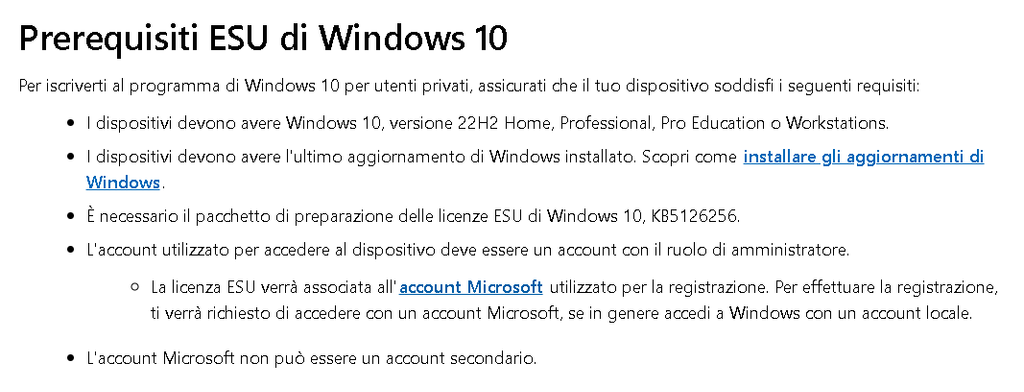
You need an eligible PC running Windows 10 22H2, up to date, and an administrator account.
Open Settings > Update & Security > Windows Update, select Enroll now, if available, and follow the steps. You can check your enrollment status on the same screen.
The consumer program is not intended for commercial scenarios: for a managed business computer, consult your IT department and the ESU terms for organizations.
Switching to Windows 11: check compatibility first
If the computer is compatible, Microsoft offers a free upgrade to the equivalent edition of Windows 11. [1]
The check goes beyond RAM capacity: Windows 11 also requires a compatible processor, TPM 2.0 and UEFI firmware with support for Secure Boot. The PC Health Check helps identify missing requirements. So having a computer that is still fast is not enough to guarantee it is eligible. [3]
Before migrating, save a copy of your important documents and check the programs and peripherals you use every day. If the PC is not eligible, ESU gives you more time to plan its replacement.
And Word, Excel, and Microsoft 365?
Microsoft 365 applications can continue to work on Windows 10. Microsoft provides security updates for these apps through 10 October 2028, while recommending a move to Windows 11.
This date applies to Microsoft 365: does not extend security updates for Windows 10. The two deadlines should be considered separately.
For those still using Windows 10, the first step is to check Windows Update: verify ESU enrollment or whether the upgrade to Windows 11 lets you choose how to proceed based on your PC’s actual situation.