Angolo di Windows
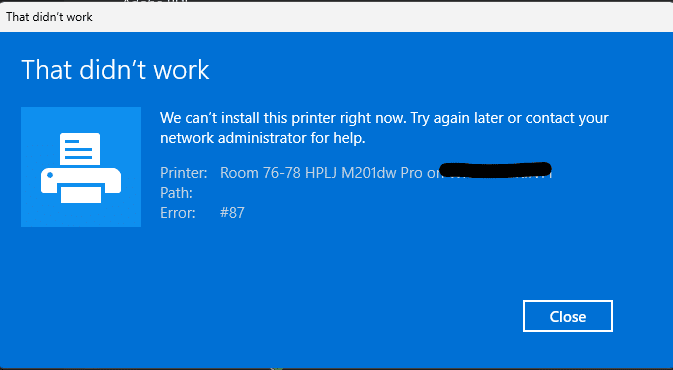
The issue appears to cause error code 87 when adding a network printer.
The security updates distributed by Microsoft on 13 October 2026 introduce an important change in the handling of credentials derived from NTLMv1. The change, designed to improve Windows security, could cause authentication problems in some business environments, particularly with Wi-Fi, Ethernet, and VPN connections that use MS-CHAPv2.
The first reports also emerged among IT administrators who follow the German blog BornCity, where several users reported difficulties connecting to corporate wireless networks after installing the updates.
The change was confirmed by Microsoft in its documentation KB5066470, which clarifies the new default behavior of Windows and indicates a possible temporary workaround for organizations that still use the affected authentication mechanisms.
What’s changing with the October 2026 updates
The change concerns the handling of credentials derived from NTLMv1 encryption and used in some Single Sign-On (SSO) scenarios.
Microsoft had already begun addressing this component in 2025, introducing a audit mechanism to identify applications and connections that still depend on authentication technologies considered obsolete.
Until the September 2026 updates, when the value BlockNtlmv1SSO was not configured, the system generally operated in Audit: requests to generate the affected credentials were logged but not blocked.
With updates released starting 13 October 2026, the default behavior changes.
| Setting | Before October 2026 | Starting in October 2026 |
|---|---|---|
| Default mode, when value is not configured | Audit (0) | Enforce (1) |
| NTLMv1-derived credentials for SSO | Allowed and logged | Blocked |
| Event logging | Warning, ID 4024 | Error, ID 4025 |
| Potential impact | No disruption caused by the control | Possible authentication errors |
It is important to note that Microsoft does not automatically change the value in the Registry. The new behavior is applied internally when BlockNtlmv1SSO has not been explicitly configured.
The change affects devices on which Credential Guard is disabled. On systems with Credential Guard enabled, the change described has no additional effects.
Why might some Wi-Fi and VPN connections stop working?
Although NTLMv1 has been removed as a protocol from more recent versions of Windows, some related cryptographic components are still used by certain authentication methods.
These include MS-CHAPv2, used in some corporate configurations that rely on:
- Wi-Fi Enterprise with PEAP-MSCHAPv2.
- Wired network authentication via EAP-MSCHAPv2.
- VPN connections that use MS-CHAPv2.
- Single Sign-On mechanisms integrated with domain credentials.
In these environments, Windows may need to generate NTLMv1-derived credentials to automatically authenticate using the credentials of the user who is already signed in.
When Enforce mode is enabled, this operation is blocked.
As a result, a configuration that worked before Patch Tuesday may no longer be able to complete automatic authentication.
This does not mean that all MS-CHAPv2 connections are necessarily affected. Microsoft specifies that manually entering credentials may continue to work, because the restriction specifically concerns the generation of NTLMv1-derived credentials for Single Sign-On.
Which versions of Windows are affected?
Microsoft’s documentation identifies the following versions:
- Windows 11 24H2.
- Windows 11 25H2.
- Windows 11 26H1.
- Windows 11 26H2.
- Windows Server 2025.
For Windows 11 24H2, 25H2 and 26H2, the cumulative update dated 13 October 2026 is identified as KB5127648.
The change therefore mainly affects corporate environments that use centralized authentication configurations and recent versions of Windows.
This behavior should not be confused with a general outage of NTLM or network connections: the impact depends on the specific authentication configuration.
How to check whether the issue is caused by the NTLMv1 block
Before changing the configuration of security it is advisable to check for events associated with the new control.
Windows provides a dedicated log:
Registro applicazioni e servizi > Microsoft > Windows > NTLM > Operational
There are two main events.
Event ID 4024 – Audit
Indicates that a process attempted to use NTLMv1-derived credentials for Single Sign-On.
In Audit mode, the attempt is logged but allowed.
Event ID 4025 – Enforce
Indicates that Windows blocked an attempt to use NTLMv1-derived credentials for Single Sign-On.
This event is particularly important when a device can no longer connect automatically to the corporate network after the updates.
The events may contain information about the destination server, the user involved, and the process that requested authentication.
For IT administrators, these details can help identify the configuration or component that needs updating.
How to temporarily restore authentication
Microsoft documents the option of using Audit mode as a temporary exception when an organization identifies a critical dependency that cannot be eliminated immediately.
The setting is controlled by the DWORD value BlockNtlmv1SSO.
The official path is:
HKEY_LOCAL_MACHINE\SYSTEM\CurrentControlSet\Control\Lsa\MSV1_0
The available values are:
- 0 – Audit: affected requests are logged but allowed.
- 1 – Enforce: affected requests are blocked.
To temporarily configure Audit mode, you can open Command Prompt as an administrator and run:
reg add "HKLM\SYSTEM\CurrentControlSet\Control\Lsa\MSV1_0" /v BlockNtlmv1SSO /t REG_DWORD /d 0 /fAccording to Microsoft, the change does not require a device restart.
Warning: this operation reduces the protection introduced by the October 2026 updates. It should therefore not be applied indiscriminately to all corporate computers.
It should be used only on affected systems, after verifying the cause of the error and assessing the security risk.
Once the authentication infrastructure has been updated, the protected behavior must be restored.
To explicitly set Enforce:
reg add "HKLM\SYSTEM\CurrentControlSet\Control\Lsa\MSV1_0" /v BlockNtlmv1SSO /t REG_DWORD /d 1 /fAlternatively, after removing the dependency, you can delete any temporary exception and let Windows use the default behavior provided by the updates.
Why disabling the control is not a definitive solution
Strengthening NTLM settings is part of a process started by Microsoft several years ago.
NTLMv1 is a legacy protocol based on cryptographic mechanisms considered inadequate by current security requirements.
The ability to generate NTLMv1-derived credentials is a dependency that Microsoft intends to phase out progressively.
Restoring Audit mode may temporarily resolve an operational problem, but it keeps a mechanism usable that the operating system is trying to restrict.
For this reason, in corporate environments it is preferable to:
- Identify connections that depend on derived NTLMv1 credentials.
- Check the configurations of RADIUS servers and authentication systems.
- Consider alternative methods, such as EAP-TLS with certificate-based authentication.
- Check the use and compatibility of Credential Guard.
- Remove temporary exceptions after completing the migration.
An approach based on auditing makes it possible to identify dependencies before they result in service disruptions.
A security change, not an update bug
It is important to distinguish this scenario from problems unintentionally caused by cumulative updates.
The transition from Audit mode to Enforce mode represents an intentional change to Windows behavior.
As a consequence, corporate configurations that previously worked may no longer be compatible with the new default settings.
This explains why reports emerged at the same time as the 13 October 2026 Patch Tuesday, even though this is not necessarily a code error introduced by the updates.
Microsoft had already documented this process in 2025, giving administrators the opportunity to identify potential dependencies in advance through audit events.
Conclusions
The October 2026 updates mark another step in strengthening the security of Windows authentication.
The default blocking of NTLMv1-derived credentials for Single Sign-On may cause problems in some Wi-Fi, Ethernet, and VPN infrastructures that use MS-CHAPv2, especially when Credential Guard is not enabled.
Changing the value BlockNtlmv1SSO may be a temporary solution to restore operational continuity, but it should not become a permanent configuration.
For system administrators, the message is clear: identify and remove dependencies on legacy authentication mechanisms, rather than continuing to keep them active through exceptions to the new protections.
Sources
- Microsoft Support – KB5066470: Manage NTLMv1 changes and prevent network authentication issues in Windows
- BornCity – Patchday: Windows 10/11 Updates (13 October 2026)
- Microsoft – Windows 11 October 2026 security update KB5127648