 Fantino Bianchi
If, after the first fix released in September, you thought you had finally put the annoying copy function issue behind you, you may have noticed the issue suddenly return. Many users who work with spreadsheets every day once again found themselves unable to work properly. In this article, we take a closer look at what is happening and how to apply the definitive corrective update released by Microsoft to permanently resolve the problem in Excel 2016.
Microsoft’s U-turn: the bug reintroduced in October
The situation immediately seemed paradoxical to anyone who had followed the initial stages of the problem. After the fixes Microsoft rolled out in September 2026, the situation seemed to have stabilized. However, due to an unexpected code regression, the subsequent update released in October accidentally reintroduced the bug into the systems.
This technical issue is particularly noticeable in workbooks that contain advanced or specific elements, such as conditional formatting. When a user tries to copy, paste, duplicate, or drag cells with this formatting applied, the command fails silently, often leaving the user with no error message visible on screen.
The official solution: Build 16.0.5574.1006

To remedy this additional technical inconvenience and correct the regression introduced inadvertently, Microsoft has released a new targeted update for Excel 2016.
Technical details of the new build:
- Version: Build 16.0.5574.1006
- What’s included: The new version includes all the latest security updates for Microsoft Excel 2016.
- Specific fix: Permanently fixes the bug inherited from the previous build 16.0.5574.1005, fully restoring the normal operation of copy and paste and the handling of conditional formatting.
How to update Excel and verify the fix
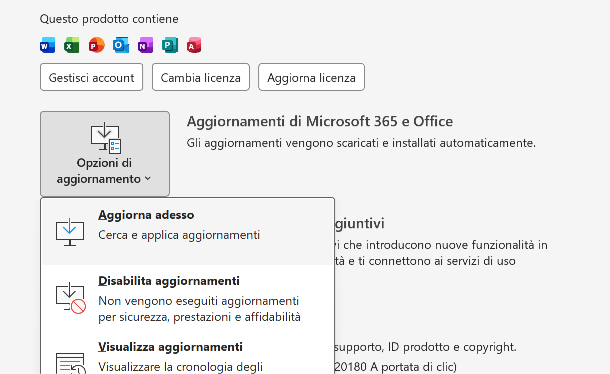
If you’re still experiencing issues or copy and paste continues not to respond in your worksheets, it’s essential to update the software as soon as possible by following these steps:
- Launch any Office suite application, such as Excel.
- Click the File tab in the top-left corner and select Account (or Office Account).
- Find the section for updates, click Update Options and then select Update Now.
- Wait for the download to finish and check that the installed version matches build 16.0.5574.1006 or later.
Once the update is complete, restart the application and test the copy and paste commands, the keyboard shortcut, and dragging formulas again to make sure everything works correctly.
Final thoughts and recommendations
Incidents like this show how complex and interconnected modern software is, and how a single corrective update can sometimes trigger unexpected side effects. If you use Excel for work or professionally, we recommend always checking that your organization’s update channel has received the latest corrective patch before considering alternative solutions or complex manual changes to system files.
When an update breaks a fundamental feature of a program used by millions of people every day, the problem isn’t just technical.
It’s also an example of how dependent we have become on the software ecosystem we use every day.
I also write about these changes and their potential long-term consequences on Substack.
Subscribe to Angolo di Windows on Substack